What happens when you delete an invoice in QuickBooks?
Deleting an invoice in QuickBooks Online may seem straightforward.
Maybe the invoice was created twice.
Maybe the customer never should have been billed.
Maybe your CRM created an invoice automatically and someone created another one manually in QuickBooks.
Or maybe you’re cleaning up old Accounts Receivable and find invoices that don’t appear to belong there.
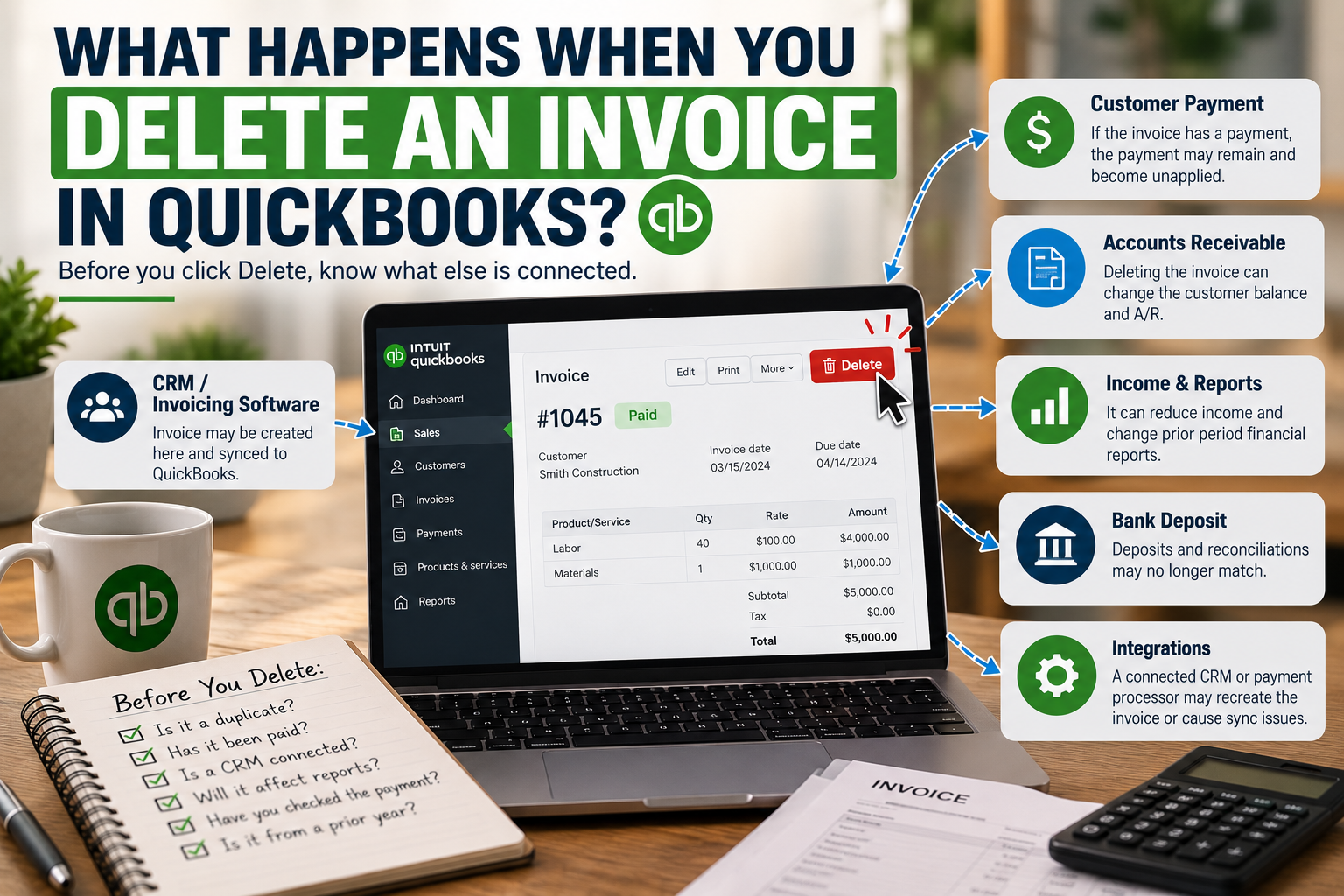
Before clicking Delete, however, it’s important to understand that an invoice affects more than the customer’s transaction list.
Depending on the situation, deleting an invoice can affect:
- Accounts Receivable
- Income
- Customer balances
- Previously recorded payments
- Cash-basis reports
- Sales tax reporting
- Historical financial statements
- Connected CRM or invoicing software
- Bank reconciliation workflows
And if the invoice has already been paid, deleting it can create an entirely different problem: an unapplied customer payment.
QuickBooks removes a deleted transaction from the books, although information about that deletion remains in the Audit Log. Unlike a voided invoice, which remains in the records with a zero balance, a deleted invoice no longer appears as an active transaction.
So before deleting an invoice, the most important question isn’t:
“Do I want this invoice gone?”
It’s:
“Why is this invoice here, and what else is connected to it?”
What Does an Invoice Do in QuickBooks Online?
An invoice records money a customer owes your business.
When you create an invoice, QuickBooks generally increases:
Accounts Receivable
and records the related:
Income
The customer then makes a payment, which reduces Accounts Receivable.
That means an invoice isn’t simply a document you send to a customer. It’s also an accounting transaction.

If you delete it, you change the accounting records associated with it.
For example, assume you have an invoice for:
$5,000
Before payment, QuickBooks may show:
- Sales income: $5,000
- Accounts Receivable: $5,000
If that invoice is deleted, the invoice no longer contributes that $5,000 to the books.
That’s appropriate if the invoice was truly a duplicate or should never have existed.
It can be a serious problem if the customer actually owed—and perhaps already paid—the $5,000.
What Happens When You Delete an Unpaid Invoice?
If the invoice hasn’t been paid, the situation is usually relatively straightforward.
Deleting it removes the invoice from QuickBooks, which means it no longer contributes to the customer’s outstanding balance or the accounting totals generated by that invoice.
Intuit states that deleted transactions are removed everywhere except the Audit Log.
That means deleting a legitimate unpaid invoice can make:
- Accounts Receivable decrease
- Customer balances decrease
- Revenue decrease on accrual-basis reporting
- Prior-period financial statements change
Imagine you issued a $12,000 invoice in December.
Your books were used to prepare financial reports.
Then in March, someone decides the invoice “looks old” and deletes it.
You haven’t simply cleaned up the customer’s account.
You’ve changed December’s accounting records.
That is why old invoices should be investigated rather than deleted simply because they have been sitting in Accounts Receivable for a long time.
What Happens If You Delete a Paid Invoice?
This is where things get more interesting.
Deleting a paid invoice does not necessarily delete the customer payment that was associated with it.
Intuit’s guidance on unapplied payments explains that payments that aren’t attached to invoices affect Accounts Receivable differently, and missing invoices may need to be recreated before those payments can be properly applied. Intuit community guidance specifically notes that when a paid invoice is deleted, the previously associated payment can become unapplied.
So imagine:
Invoice: $5,000
Customer payment: $5,000
Everything is correct.
Then someone deletes the invoice.
The invoice disappears.
But the payment may remain.
Now QuickBooks essentially knows:
“I received $5,000 from this customer, but I no longer have an invoice telling me what they paid.”
That payment can become an unapplied payment or customer credit.
Why Unapplied Payments Matter
An unapplied customer payment isn’t automatically harmless.
It can affect:
- Customer balances
- Accounts Receivable
- Cash-basis Profit & Loss reporting
- How future invoices are paid
- Cleanup work later
QuickBooks uses an Unapplied Cash Payment Income account in cash-basis reporting when a payment has been received but isn’t applied to a corresponding sales form.
That can create confusing reports.
For example, you may notice:
- A negative Accounts Receivable balance
- Customer credits that don’t make sense
- Unapplied Cash Payment Income on the Profit & Loss
- New invoices mysteriously being offset by old payments
- Payments that appear to have no invoice
The original problem may simply be that someone deleted the invoice months earlier.
Deleting an Invoice Can Change Historical Reports
This is one reason I don’t recommend casually deleting old invoices during cleanup work.
Imagine you’re reviewing books in 2026 and discover an invoice from 2024.
You think:
“The customer doesn’t owe this anymore, so I’ll delete it.”
But that doesn’t tell you why the invoice remains open.
Possibilities include:
- The customer never paid it.
- The customer paid it, but the payment wasn’t linked correctly.
- The payment exists under another customer.
- The invoice was duplicated.
- The payment was entered directly as a deposit instead.
- A CRM created the invoice while another system recorded the payment.
- The invoice should have been written off rather than deleted.
- Someone changed historical transactions after the books were completed.
Each scenario requires a different solution.
Deleting the invoice before figuring out which one applies can make the books harder to fix.
Deleting an Invoice vs. Voiding an Invoice in QuickBooks
QuickBooks gives you the option to void certain transactions, including invoices.
There is an important difference.
Deleting an invoice
The transaction is removed from the accounting records, other than its history in the Audit Log.
Voiding an invoice
The invoice remains in QuickBooks but its amount becomes zero and it is marked as void.
Intuit specifically notes that voiding is often preferable for recordkeeping because it preserves evidence that the transaction existed.
That doesn’t mean you should always void instead of delete.
If someone accidentally created an invoice twice five minutes ago, deleting the duplicate may make perfect sense.
But if you’re modifying an invoice from a prior period, understanding its history becomes much more important.
What Happens When a CRM or Invoicing System Is Connected to QuickBooks?
This is where invoice deletion can become much more complicated.
Many businesses don’t create their invoices directly inside QuickBooks.
They may use:
- ServiceTitan
- Jobber
- Housecall Pro
- JobTread
- Buildertrend
- A construction CRM
- An industry-specific invoicing platform
- A payment processor
- E-commerce software
- Custom software
- Zapier or another automation platform
The invoice might begin in that outside system and then sync into QuickBooks.
Now imagine someone opens QuickBooks, sees an invoice they don’t recognize and deletes it.
The problem is that QuickBooks may not be the original source of that invoice.
The CRM could still contain it.
What happens next depends on how that particular integration works.
The external system might:
- Leave the invoice deleted in QuickBooks
- Attempt to sync it again
- Recreate it
- Continue showing the customer as paid
- Continue sending payment information
- Create a synchronization error
- Produce different Accounts Receivable balances between the two systems
There is no universal answer because every integration handles synchronization differently.
That is precisely why invoices created by connected software should not be deleted until you understand the integration workflow.
A Common CRM-to-QuickBooks Problem
Let’s look at a simplified example.
A contractor uses a CRM to create an invoice:
Invoice #1054: $7,500
The invoice syncs to QuickBooks.
The customer pays through the CRM.
The payment also syncs into QuickBooks.
Everything is correct.
Later, someone sees the QuickBooks invoice and thinks:
“We invoice through the CRM. We don’t need this invoice here.”
They delete it.
Now:
- The CRM still shows the invoice.
- The CRM may show it as paid.
- QuickBooks no longer has the invoice.
- The $7,500 payment may remain in QuickBooks as unapplied.
- Accounts Receivable in the CRM and QBO may no longer agree.
Someone trying to “fix” that difference later may accidentally create another invoice.
Now you may have a chain of corrections caused by one unnecessary deletion.
Duplicate Invoices Are Another Integration Problem
Deleting an invoice isn’t always wrong.
Sometimes a CRM integration really has created a duplicate.
For example:
CRM creates:
Invoice #1234 – $8,000
and syncs it into QuickBooks.
Someone on the accounting side doesn’t realize the invoice is syncing automatically and manually creates:
Invoice #1234A – $8,000
Now QuickBooks shows:
$16,000 Accounts Receivable
even though the customer only owes $8,000.
One of those invoices probably needs to be removed.
But before deleting either one, determine:
- Which invoice originated in the CRM?
- Which one is connected to the customer’s payment?
- Which invoice contains the correct products/services?
- Which invoice is being tracked by the external system?
- Has either invoice already appeared on prior financial reports?
The goal isn’t simply:
Delete one $8,000 invoice.
The goal is:
Keep the transaction that correctly represents what actually happened.
Be Careful When the Invoice Is Already Connected to a Payment
This is especially important in cleanup work.
Suppose you see:
Invoice: $10,000
Payment: $10,000
Deposit: $9,700
The payment processor withheld:
$300 merchant fee
At first glance, someone might think:
“Something is duplicated. I’ll delete the invoice.”
But perhaps nothing is duplicated at all.
The correct accounting may simply be:
Sales: $10,000
Merchant fee: $300
Bank deposit: $9,700
Deleting the invoice could create a completely different problem.
When payment processors, CRMs and QuickBooks are connected, trace the transaction from beginning to end before deciding anything is duplicated.
Can Deleting an Invoice Affect Undeposited Funds?
It can create related cleanup problems, particularly when payments and deposits are already recorded.
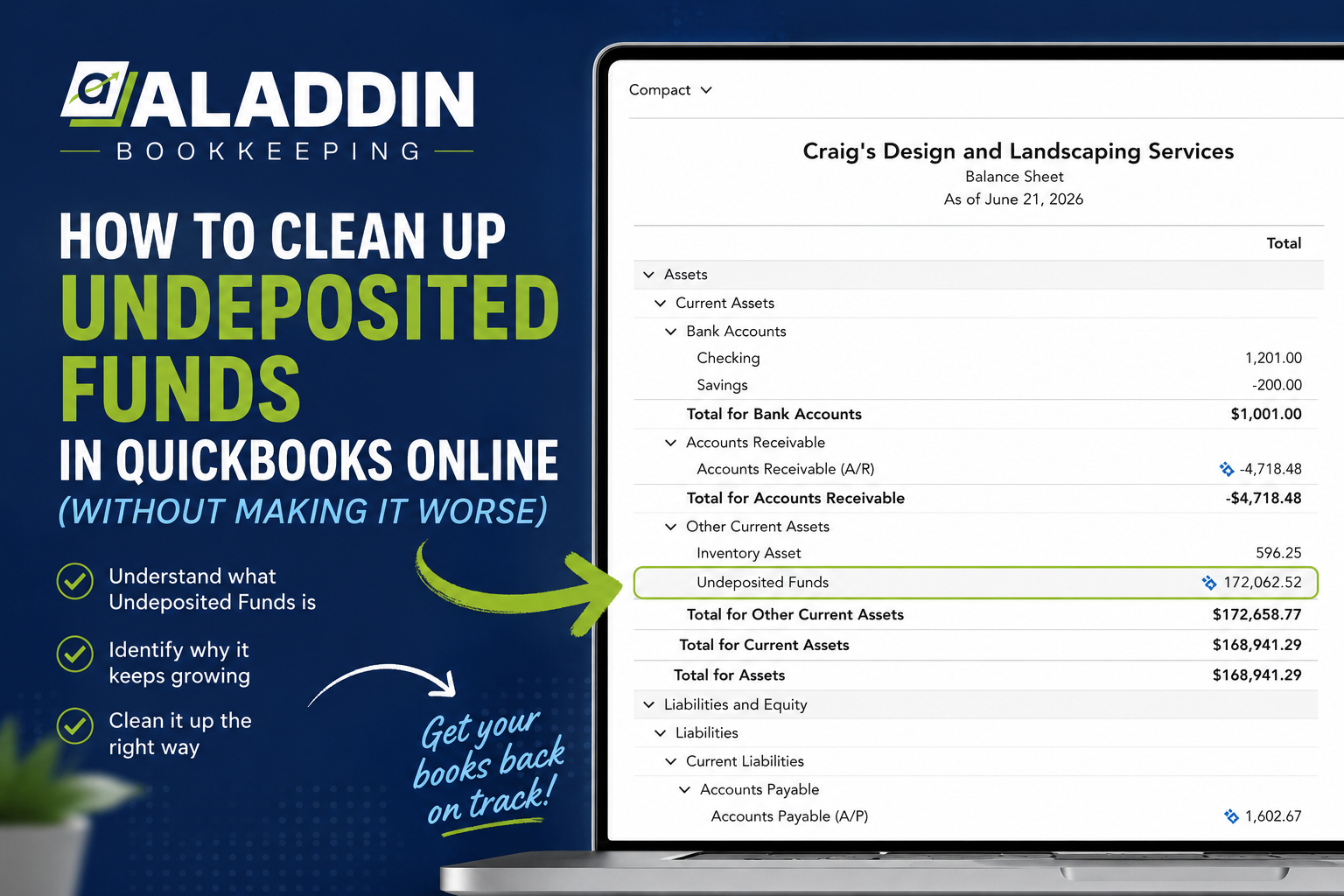
QuickBooks commonly uses Undeposited Funds as a temporary holding account for customer payments before they are included in a bank deposit.
If the invoice is deleted but its payment remains, the payment itself still needs to be understood.
A messy file may then contain:
- Unapplied customer payments
- Old Undeposited Funds balances
- Deposits recorded separately
- Duplicate income
- CRM-created payments
- Bank-feed deposits added directly to income
This can make what started as an invoicing problem look like a banking problem.
That’s why Accounts Receivable, customer payments, Undeposited Funds and bank deposits should often be reviewed together during a cleanup.
What If Someone Already Deleted the Invoice?
Don’t panic and don’t immediately create a replacement based on memory.
QuickBooks Online maintains an Audit Log that records changes and deleted transactions. Intuit says that a deleted transaction itself cannot simply be restored, but its information can be reviewed in the Audit Log and used to recreate the transaction manually.
To investigate a deleted invoice:
- Go to Settings.
- Open the Audit Log.
- Filter by the appropriate user, date and event.
- Locate the deleted invoice.
- Open the transaction history.
- Review the original details.
- Determine whether the invoice actually needs to be recreated.
The last step is important.
Finding a deleted invoice doesn’t automatically mean it belongs back in the books.
First determine why it was deleted.
Check for an Unapplied Payment Before Recreating the Invoice
If the original invoice had been paid, look for the payment before entering another one.
Otherwise, you might recreate:
Invoice: $5,000
and then accidentally create another:
Payment: $5,000
even though the original payment was already sitting in QuickBooks.
QuickBooks specifically recommends reviewing customer balance detail for unapplied payments and applying valid payments to the correct invoices.
This is one of those situations where fixing one mistake without investigating the surrounding transactions can create another.
What Should You Check Before Deleting an Invoice?
Before clicking Delete, I would answer these questions:
1. Is the invoice actually incorrect?
Confirm that it is duplicated, entered accidentally, or otherwise shouldn’t exist.
2. Has the customer already paid it?
If so, locate the payment.
3. Is the payment part of a bank deposit?
Trace the money all the way to the bank.
4. Did the invoice originate in QuickBooks?
Or did it come from another system?
5. Is a CRM or invoicing platform connected?
Determine whether deleting the invoice in QBO will create a mismatch between systems.
6. Is the invoice from a prior year?
If prior financial statements or tax filings relied on that period, historical changes should be made carefully.
7. Is the customer balance wrong because of the invoice—or because of something else?
Sometimes the invoice isn’t the problem.
The payment workflow is.
When Deleting an Invoice Probably Makes Sense
Deleting can be reasonable when you’re confident the transaction should never have existed.
Examples may include:
- An invoice was accidentally entered twice.
- A test invoice was saved.
- An integration created a true duplicate.
- Someone created the invoice under the wrong customer and you’re correcting it immediately.
- The invoice was created accidentally and has no payment or other transaction attached.
Even then, review the surrounding activity first.
When You Should Slow Down Before Deleting
Be much more cautious if:
- The invoice is from a prior year.
- It has a payment attached.
- It came from a CRM.
- Accounts Receivable already looks unusual.
- The customer has a credit balance.
- The invoice is part of a progress-billing workflow.
- The related deposit is already reconciled.
- The invoice affects sales tax.
- You’re cleaning up books you didn’t originally maintain.
These are situations where understanding the history matters more than making the screen look clean.
Don’t Delete Old Invoices Just to Clean Up Accounts Receivable
One of the biggest mistakes in historical QuickBooks cleanup is assuming:
“Old = wrong.”
An old invoice may represent a genuine amount that was never collected.
If it is no longer collectible, the appropriate treatment may involve a bad-debt process depending on the business’s accounting and tax circumstances—not simply deleting the original sale.
And sometimes an old invoice was paid.
The payment just wasn’t applied correctly.
Intuit notes that unapplied payments are a common reason for unusual Accounts Receivable balances and recommends applying valid customer payments to their corresponding invoices.
Deleting the invoice in that situation treats the symptom rather than the cause.
A Better QuickBooks Cleanup Rule
When you find a transaction that doesn’t make sense, don’t start with:
“How do I get rid of this?”
Start with:
“What created this?”
That question changes everything.
If a CRM created it, investigate the integration.
If a payment created the problem, trace the payment.
If a bank deposit was entered separately, review the deposit.
If someone edited historical books, check the Audit Log.
If the invoice is legitimate but uncollectible, determine the proper accounting treatment.
Good bookkeeping cleanup isn’t about making strange balances disappear.
It’s about identifying why they’re there.
Frequently Asked Questions
What happens when you delete an invoice in QuickBooks Online?
The invoice is removed from the books and no longer contributes to the balances associated with that transaction. QuickBooks retains information about the deletion in the Audit Log.
Can you restore a deleted QuickBooks invoice?
Not directly. Intuit says deleted transactions cannot be restored automatically. You can review the deleted transaction in the Audit Log and manually recreate it if necessary.
What happens to a payment when you delete the invoice?
If a payment was attached to the invoice, the payment may remain and become unapplied rather than disappearing with the invoice. Unapplied payments should be reviewed and, when appropriate, applied to the correct invoice.
Does deleting an invoice reduce income?
An invoice affects income and Accounts Receivable under accrual accounting, so deleting a legitimate invoice can change those balances and historical financial reporting.
Can deleting an invoice create negative Accounts Receivable?
Unapplied payments can contribute to negative or unusual Accounts Receivable balances. If an invoice is deleted while its payment remains, the payment may become unapplied.
Should I delete or void an invoice?
It depends on why you’re removing it. Voiding preserves a zero-dollar record of the transaction, while deleting removes the transaction from the books except for its Audit Log history. Intuit notes that voiding can be preferable when maintaining a transaction record is important.
Can deleting an invoice affect my bank reconciliation?
The invoice itself isn’t a bank transaction, but connected customer payments and deposits can be part of the reconciliation workflow. Deleting an invoice without understanding its payment history can create unapplied payments and other discrepancies that complicate cleanup.
What if my CRM created the invoice?
Check the integration before deleting anything. The CRM may remain the source of the invoice, and synchronization behavior varies by application. Determine whether the invoice should be corrected in the CRM rather than directly in QuickBooks.
Why did my deleted invoice come back?
If an external CRM or invoicing system is responsible for creating invoices in QBO, the integration may potentially recreate or resync information depending on its configuration. Review the connected application’s synchronization rules rather than repeatedly deleting transactions.
How do I find out who deleted an invoice?
Use the QuickBooks Online Audit Log. It records transaction changes and can identify the user or system associated with an activity. Intuit says Audit Log events are currently retained for two years.
Final Thoughts
Deleting an invoice in QuickBooks isn’t necessarily wrong.
Sometimes it’s exactly what should happen.
The danger comes from deleting the invoice before understanding what it is connected to.
An invoice can be linked to customer payments, deposits, Accounts Receivable, revenue, sales tax and external software.
And when a CRM or invoicing system is connected to QuickBooks, the transaction you see in QBO may only be one piece of a much larger workflow.
Before deleting an invoice, trace the transaction:
Invoice → Payment → Deposit → Bank
And, if applicable:
CRM → QuickBooks → Payment Processor → Bank
If those pieces agree and you’ve confirmed the invoice is truly a duplicate or mistake, deleting it may be appropriate.
If they don’t agree, the invoice may not actually be the problem.
Call to Action
Deleted Invoices Causing Problems in QuickBooks?
If your Accounts Receivable doesn’t make sense, customer payments are sitting unapplied, Undeposited Funds keeps growing, or your CRM and QuickBooks no longer agree, simply deleting transactions can make the problem worse.
At Aladdin Bookkeeping, we help businesses clean up QuickBooks Online, investigate historical transactions, identify duplicate invoices and payments, and untangle problems caused by CRM, invoicing and payment integrations.
Our goal isn’t just to make the balance disappear.
We look for what caused it in the first place.
If you aren’t confident that your QuickBooks customer balances and financial reports are accurate, contact Aladdin Bookkeeping to discuss your QuickBooks cleanup needs.