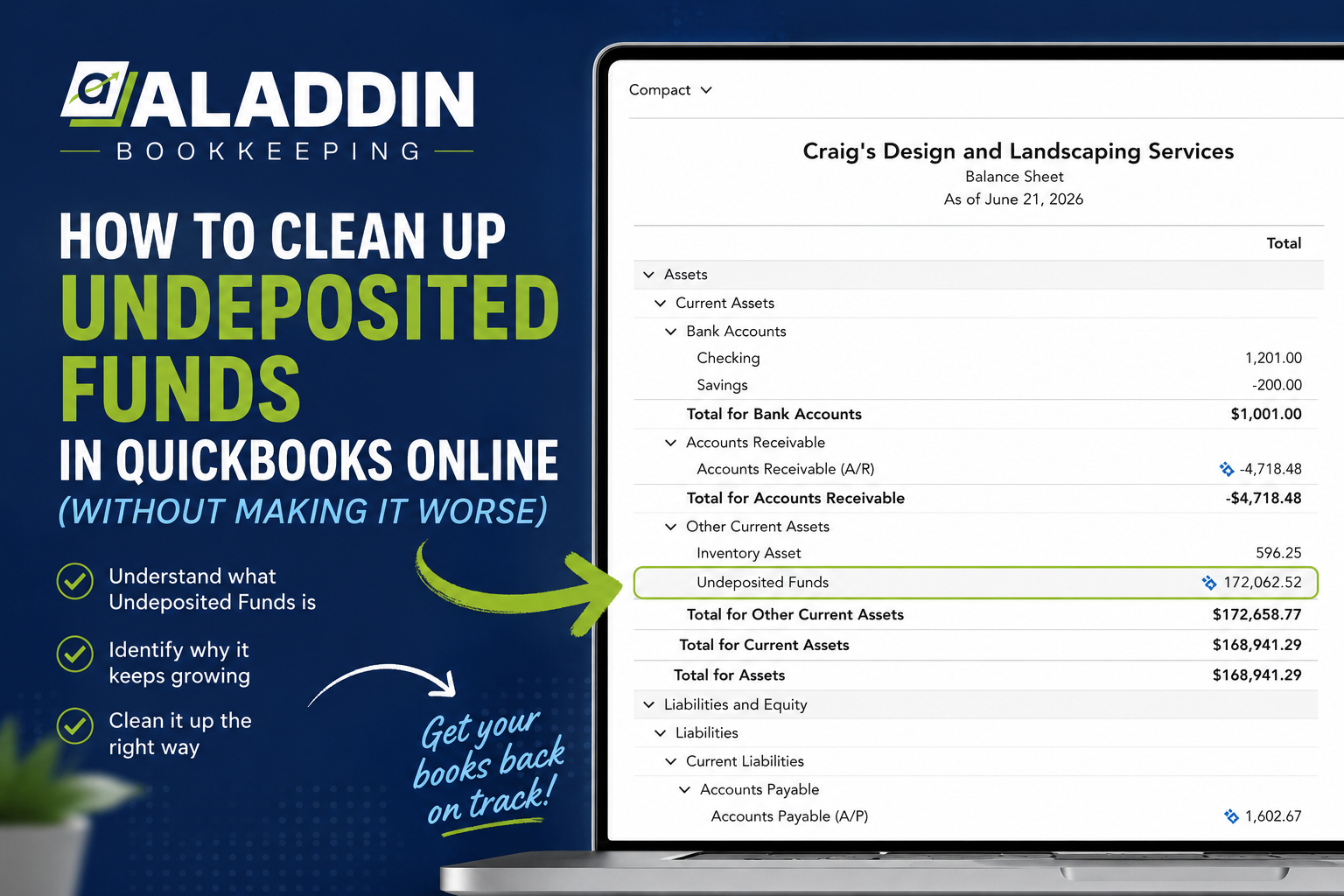
If you’ve opened your QuickBooks Online Balance Sheet and noticed a large balance sitting in Undeposited Funds, you’re not alone.
For many business owners, Undeposited Funds becomes one of the most confusing accounts in QuickBooks. I’ve seen businesses with balances that are only a few hundred dollars, while others have tens of thousands of dollars that have been sitting there for years.
The good news is that Undeposited Funds is usually fixable.
The bad news is that deleting transactions without understanding why they’re there can create duplicate income, throw off reconciliations, or make your books less accurate than when you started.
In this article, I’ll explain what Undeposited Funds is, why it grows unexpectedly, common issues caused by CRM and invoicing software integrations, and how to safely clean it up.
What Is Undeposited Funds?
Think of Undeposited Funds as a temporary holding account.
Instead of sending customer payments directly into your checking account, QuickBooks temporarily stores them in Undeposited Funds until they’re included in a bank deposit.
This is especially useful when:
- You receive multiple checks during the day.
- You deposit several payments together at the bank.
- Your bank records one combined deposit instead of individual customer payments.
For example:
Customer A pays $500.
Customer B pays $300.
Customer C pays $200.
Rather than recording three separate bank deposits, QuickBooks places each payment into Undeposited Funds until you record one $1,000 deposit that matches your bank statement.
When used correctly, Undeposited Funds helps your bookkeeping stay organized and makes bank reconciliations much easier.
Why Does Undeposited Funds Grow?
A growing Undeposited Funds balance almost always means something interrupted the normal payment workflow.
Some of the most common causes include:
- Customer payments were received but never deposited.
- Deposits were entered manually instead of through the Bank Deposit screen.
- Duplicate payments were created.
- Bank feed transactions were added instead of matched.
- Third-party software created duplicate transactions.
- Historical bookkeeping mistakes accumulated over several years.
Often, the issue isn’t a single mistake—it’s a combination of small errors that compound over time.
CRM and Invoicing Integrations Are a Common Culprit
One of the biggest issues I encounter involves businesses that connect QuickBooks Online with another platform.
Examples include:
- JobTread
- ServiceTitan
- Jobber
- Housecall Pro
- ServiceM8
- Buildertrend
- HubSpot
- Helcim
- Stripe
- Square
- Custom CRM systems
- Zapier automations
These tools can be incredibly helpful, but they also introduce additional complexity.
If both systems attempt to record the same payment—or if they aren’t configured correctly—you may end up with duplicate transactions that cause Undeposited Funds to grow.

For example, a CRM might create:
- the customer invoice,
- the customer payment,
while your payment processor separately sends payment information into QuickBooks.
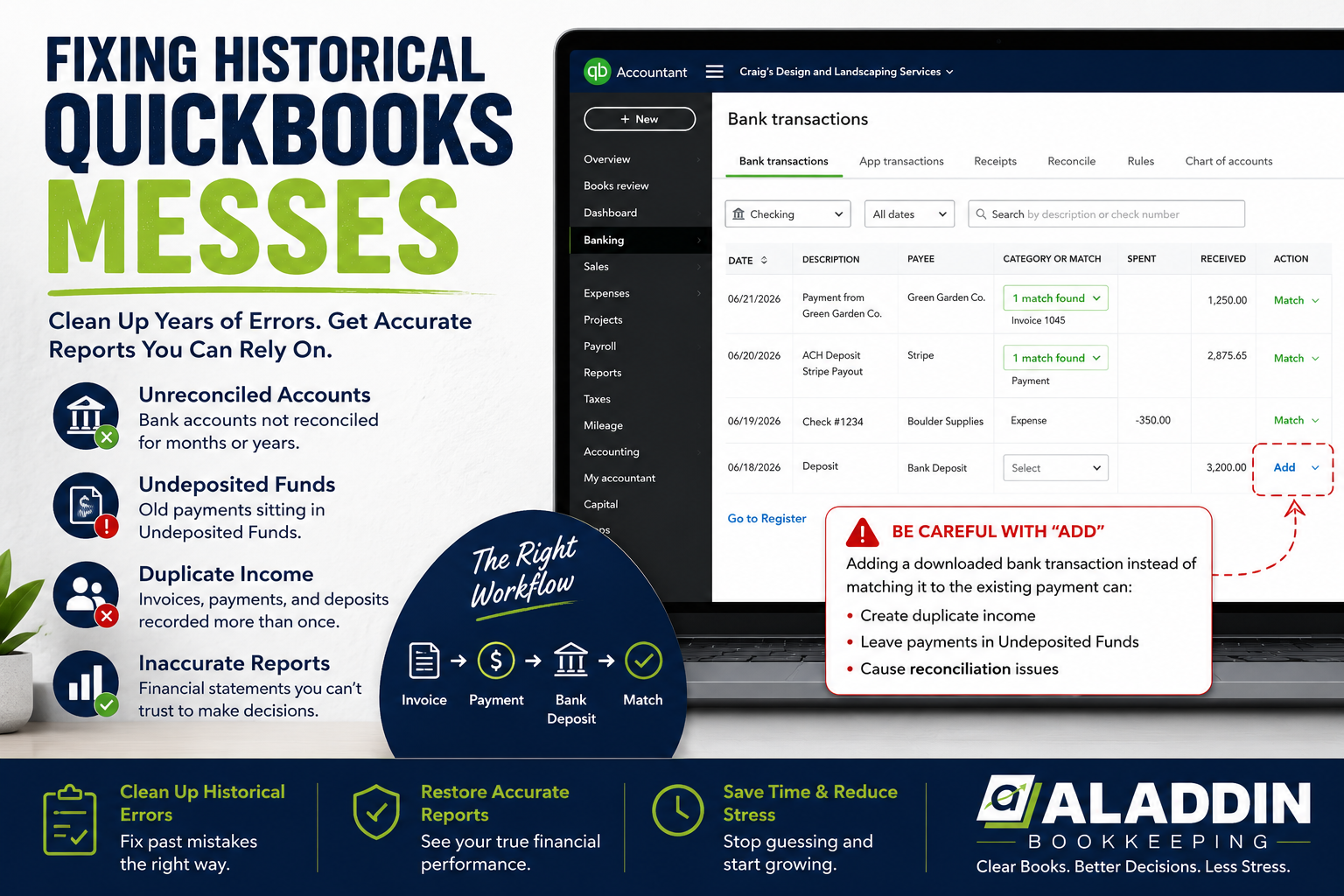
Then, when the bank deposit downloads through the bank feed, someone clicks Add instead of Match.
Now QuickBooks has multiple versions of the same payment.
Over time, these duplicate transactions create balances in Undeposited Funds that don’t represent real money waiting to be deposited.
Another Common Scenario: Bank Feed Mistakes
QuickBooks’ bank feed is one of its best features—but only when used correctly.
Suppose you receive a customer payment.
QuickBooks places it into Undeposited Funds.
Later, the deposit appears in your bank feed.
Instead of matching it to the existing payment, someone selects Add.
QuickBooks now creates an entirely new income transaction.
The original payment remains stuck in Undeposited Funds because it was never cleared through a Bank Deposit.
This is one of the fastest ways for Undeposited Funds to accumulate.
Why Deleting Transactions Isn’t the Answer
Many people discover a large Undeposited Funds balance and immediately begin deleting payments.
Unfortunately, this can make things much worse.
Deleting transactions may:
- Remove legitimate customer payments.
- Break invoice payment history.
- Cause duplicate income.
- Affect prior reconciliations.
- Create discrepancies for your CPA.
Before deleting anything, it’s important to determine why the transaction exists.
Sometimes the payment is correct.
The deposit is what’s missing.
Other times, the payment itself is duplicated.
Every situation should be evaluated carefully before making changes.
How to Investigate an Undeposited Funds Balance
Rather than making random adjustments, work through the account systematically.
Step 1: Run an Undeposited Funds report
Review:
- transaction dates,
- customer names,
- payment amounts,
- payment methods.
Look for unusually old items.
If payments from several years ago are still sitting there, they deserve further investigation.
Step 2: Compare with bank deposits
Ask yourself:
Did this money actually reach the bank?
If yes:
How was it recorded?
Often you’ll discover the bank deposit exists—but was entered manually instead of clearing the customer payments already sitting in Undeposited Funds.
Step 3: Review your integrations
If you use:
- CRM software
- payment processors
- invoicing software
- automation tools
review which system is responsible for:
- invoices,
- payments,
- deposits.
Many duplicate problems happen because multiple systems are trying to perform the same job.
A clear workflow reduces the likelihood of duplicate entries.
Step 4: Look for duplicate income
Compare:
- invoices,
- receive payments,
- sales receipts,
- deposits,
- downloaded bank transactions.
If the same payment appears multiple times in different forms, identify which transaction reflects what actually happened and which is the duplicate.
Should You Use Journal Entries?
This is a question I hear often.
Technically, journal entries can move balances out of Undeposited Funds.
However, journal entries usually don’t fix the underlying bookkeeping problem.
In most cases, they simply hide it.
The better solution is to correct the transactions that caused the balance in the first place.
Journal entries may occasionally be appropriate during historical cleanup projects, but they should be used carefully and only after understanding what created the balance.
Preventing Future Problems
Once you’ve cleaned up Undeposited Funds, you want to keep it that way.
Here are a few best practices:
Match instead of Add
Whenever possible, match downloaded bank transactions to existing QuickBooks transactions rather than creating new ones.
Understand your software integrations
Know which platform is creating:
- invoices,
- customer payments,
- deposits.
Each transaction should have one clear source.
Review Undeposited Funds regularly
Don’t wait until year-end.
Review the account monthly so small issues don’t become large cleanup projects.
Reconcile your bank accounts every month
Monthly reconciliations help identify missing or duplicate deposits before they accumulate.
Work with someone who understands integrated systems
Many bookkeeping problems today aren’t caused by QuickBooks itself.
They’re caused by the interaction between multiple software platforms.
Understanding how those systems communicate is essential for maintaining accurate books.
When It’s Time to Ask for Help
Some Undeposited Funds balances can be resolved in a few minutes.
Others require tracing hundreds—or even thousands—of transactions across multiple years.
If your business uses CRM software, payment processors, or automation tools, identifying the source of duplicate transactions can become much more complicated.
Rather than guessing, it’s often worth having someone review the workflow before making large changes.
Correcting the issue properly can save hours of frustration and help ensure your financial reports accurately reflect your business.
Frequently Asked Questions
Can I just delete everything in Undeposited Funds?
Not recommended.
Some transactions may represent legitimate customer payments that simply haven’t been linked to deposits correctly. Deleting them without investigation can create additional accounting issues.
Why is my Undeposited Funds balance negative?
A negative balance often indicates deposits were created without corresponding customer payments or that transactions were modified incorrectly. It usually requires a transaction-level review.
Can CRM software cause Undeposited Funds problems?
Yes.
If invoices, payments, and deposits are being created by multiple connected systems—or duplicated through automation—you can end up with transactions remaining in Undeposited Funds unnecessarily.
Should Undeposited Funds always be zero?
Not necessarily.
If you’ve received customer payments that haven’t yet been deposited, a balance is normal.
However, large or very old balances should usually be investigated.
How often should I review Undeposited Funds?
At least monthly.
Regular review makes it much easier to identify issues before they grow into major cleanup projects.
Final Thoughts
Undeposited Funds isn’t inherently a problem—it’s an important part of QuickBooks Online when used correctly.
The real issue arises when payments aren’t completed through the proper workflow or when multiple software systems begin creating duplicate transactions.
Taking the time to understand why the balance exists is almost always more effective than simply trying to make it disappear.
With the right process and regular reviews, Undeposited Funds can remain exactly what it was designed to be: a temporary stop on the way to an accurate bank deposit.
Need Help Cleaning Up Your QuickBooks?
If your Undeposited Funds account has grown over time or you’re dealing with duplicate transactions caused by QuickBooks integrations, we can help.
At Aladdin Bookkeeping, we specialize in cleaning up messy QuickBooks Online files, resolving reconciliation issues, and helping service-based businesses maintain accurate financial records. Whether your books have been affected by CRM integrations, payment processors, or years of accumulated bookkeeping errors, we’ll work to identify the root cause—not just cover up the symptoms.
Contact Aladdin Bookkeeping today to schedule a consultation and get your QuickBooks back on track.